
Make every enquiry owned, followed up and visible
Give your sales team one place to manage leads, customer conversations, opportunities, quotations and next actions—without depending on memory or scattered spreadsheets.
Show us your sales workflowSee sales capabilities
Bring one real workflow. We will show how it could work in TargetCRM.
Revenue leaks when follow-up depends on individuals
- Leads sit unassigned.
- Follow-up dates live in diaries or WhatsApp messages.
- Quotations are difficult to track.
- Pipeline reviews become manual reporting exercises.
- Management sees problems after the month has ended.
TargetCRM creates a shared sales operating rhythm.
See sales capabilities
Lead and enquiry management
Capture leads from multiple sources, record context, assign ownership and track qualification.
Opportunity and pipeline management
Move qualified enquiries through defined stages. See value, probability, expected close date and next action.
Follow-ups and activities
Plan calls, meetings, tasks and reminders. Make pending work visible to the user and manager.
Quotations and proposals
Create and track quotations against the customer and opportunity. Maintain revision and follow-up context.
Orders and invoices
Carry confirmed business forward into orders and invoices where included in the configured process.
Sales targets and performance
Compare targets with actual performance. Review activity, pipeline movement and conversion indicators.
Customer history
Give salespeople the relationship context they need before the next call or meeting.
Run sales from the next action—not the last spreadsheet update
Salespeople know what to do. Managers know where support is needed. Owners see a consistent pipeline without waiting for a weekly manual roll-up.
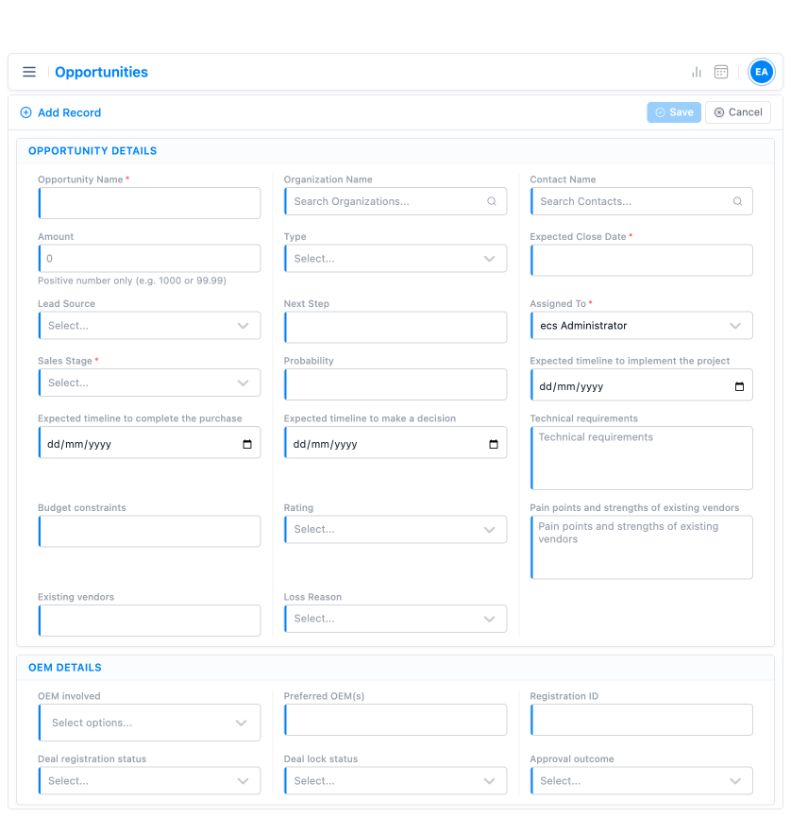
Illustrative demo interfaces, shown without customer records. Field layouts depend on configuration.
A CRM configured for how your team works
Standard implementations take 2–3 weeks when scope, users and data are ready. Complex migration, integrations or customisation can take longer.
Understand
Discuss the workflow and hand-offs.
Agree scope
Confirm priorities, users and data.
Configure
Prepare the system and supported data.
Train & launch
Help teams adopt the new process.
Improve
Support the team and refine.
Support is available through online meetings, telephone, chat and the customer portal. Discuss implementation →
Know what to expect
Can TargetCRM support our current sales stages?
Yes. We first understand your process, then configure practical stages, ownership and required information around it.
Can we manage quotations inside the CRM?
Yes. Quotation creation and tracking can be connected with accounts, contacts and opportunities.
Can management see team performance?
Yes. Dashboards, lists and reports can provide visibility into pipeline, activities, pending follow-ups and sales outcomes.
Does it work for field sales teams?
TargetCRM supports mobile access so users can review and update relevant customer and activity information away from the office.
Technical sales workflow: an ECS implementation example
Galaxy Sivtek’s TargetCRM implementation connects technical enquiries, product trials, quotation revisions and service follow-through. Configuration and delivery scope are agreed for each customer.
Galaxy Sivtek
Connecting technical enquiries, trials and customer service.
Bring your current sales tracker to the demo
We will show how TargetCRM can handle the same workflow with clearer ownership and visibility.
Show us your sales workflowReview capabilities
Email our team with your workflow and user count to request a demo.