Resolve customer issues with ownership, context and control
Manage tickets, response commitments, service contracts, customer assets and communication history from one connected support system.
Show us your support workflowExplore support capabilities
Bring one real workflow. We will show how it could work in TargetCRM.
A complaint becomes a relationship risk when nobody owns the next step
Support requests arrive through calls, messages and email. Customer history sits elsewhere. Escalation depends on people remembering to chase it.
TargetCRM gives each issue an owner, status, priority, timeline and customer context.
Explore support capabilities
Ticket management
Capture, assign, prioritise and track requests from opening to resolution.
SLA management
Define response expectations, monitor pending commitments and identify overdue work.
Service contracts
Maintain contract and support-entitlement information alongside the customer relationship.
Customer portal
Allow customers to submit and review requests through a structured portal where included in the implementation.
Knowledge base
Maintain reusable answers and process guidance for teams and customers.
Assets, machinery and equipment
Connect service tickets with relevant customer equipment, installation history and contract information.
Reduce ticket turnaround uncertainty—not just ticket volume
Support teams see pending work. Managers see delays and workload. Customers receive a more consistent response because information and responsibility are clear.
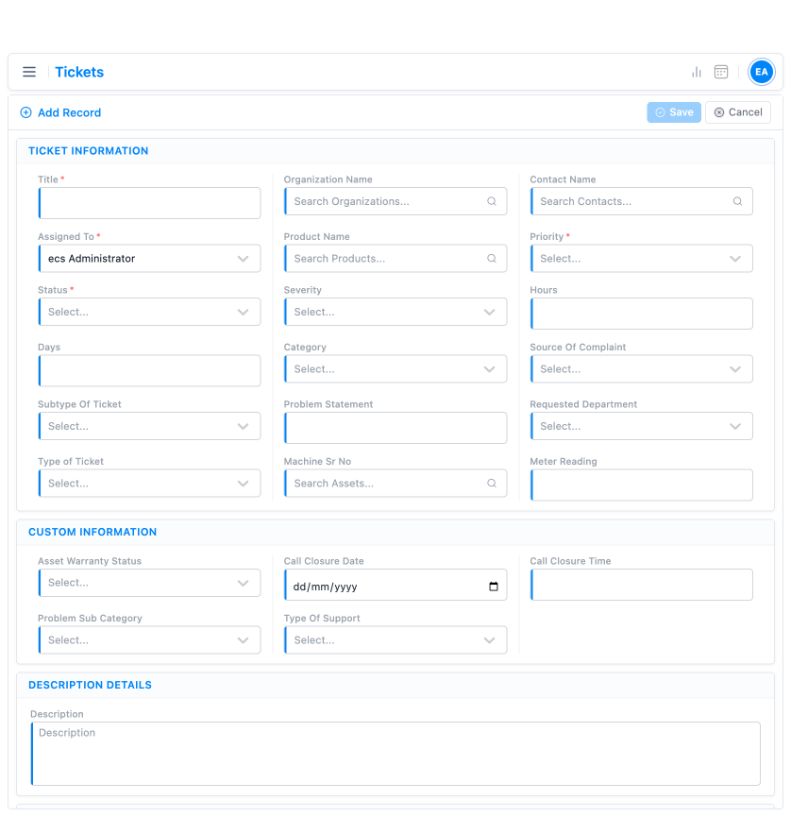
Illustrative demo interfaces, shown without customer records. Field layouts depend on configuration.
A CRM configured for how your team works
Standard implementations take 2–3 weeks when scope, users and data are ready. Complex migration, integrations or customisation can take longer.
Understand
Discuss the workflow and hand-offs.
Agree scope
Confirm priorities, users and data.
Configure
Prepare the system and supported data.
Train & launch
Help teams adopt the new process.
Improve
Support the team and refine.
Support is available through online meetings, telephone, chat and the customer portal. Discuss implementation →
Know what to expect
Can customers raise tickets themselves?
Yes. A customer portal can be included, depending on the agreed setup.
Can tickets be connected to equipment?
Yes. Tickets can be related to customer assets, machinery or equipment to preserve service context.
Can we track service contracts and SLAs?
Yes. Contract and SLA information can be maintained and used to manage service commitments.
TargetCRM service and ticket workflows in practice
Equipment businesses connect assets, service requests and approvals. SabPaisa connects ticket ownership, cross-team processing, escalation visibility and operations-controlled closure. Configuration is customer-specific.
Parker Plant India
Connecting dealer sales, service claims and SAP handovers.
Apollo Inffratech
Giving equipment service a structured path from request to approval.
SabPaisa
Rule-driven ticket routing across fintech operations.
Walk us through one recent customer escalation
We will show how ownership, history and pending action can remain visible from opening to closure.
Show us your support workflowReview capabilities
Email our team with your workflow and user count to request a demo.